

A visitor lands on your website, explores your services, and becomes interested in what your business offers. But what happens if they have a question and cannot find a quick way to contact you? They may leave and choose a competitor instead.
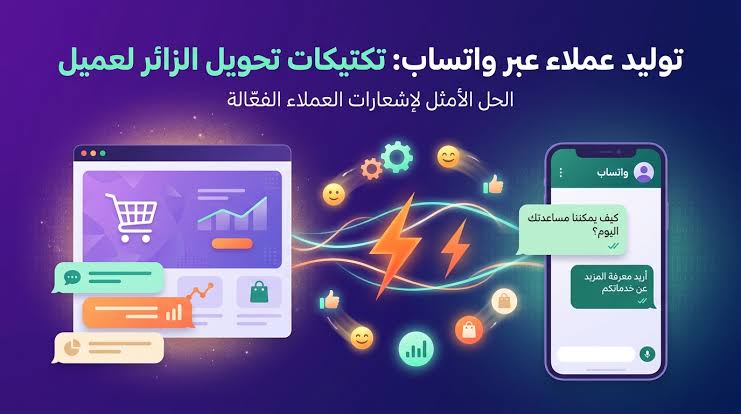
WhatsApp Website Integration gives visitors a direct way to contact your business while they are browsing your website. Instead of searching for a phone number, opening an email application, or completing a long contact form, visitors can start a conversation with one click.
For companies, factories, online stores, service providers, and local businesses, this simple connection can improve customer communication, generate qualified inquiries, and support the sales process.
In this guide, we explain how to connect WhatsApp to your website, where to place contact buttons, how to improve the customer experience, and how to turn conversations into real business opportunities.
What Is WhatsApp Website Integration?
WhatsApp Website Integration is the process of connecting a website to a WhatsApp Business number through a clickable link, contact button, chat widget, or a more advanced messaging solution.
When visitors click the WhatsApp button, they are redirected to a conversation with your business. Depending on their device and setup, WhatsApp may open in the mobile application or WhatsApp Web.
The simplest method uses an official WhatsApp Click to Chat link. It allows customers to start a conversation without saving your number in their contacts.
You can also create a link with a pre-filled message, helping visitors explain what they need before sending their inquiry.
For businesses, this creates a direct communication channel between website traffic and the sales or customer support team.
Why Should You Add WhatsApp to Your Website?
Adding WhatsApp to your website is not just about displaying another contact option. It can make it easier for interested visitors to take the next step.
1. Make It Easier for Customers to Contact You
Some visitors prefer messaging instead of calling or sending emails. A visible WhatsApp button gives them a familiar and convenient way to ask questions.
This is particularly useful for customers browsing from mobile devices, where opening a WhatsApp conversation can be more convenient than filling out a long form.
2. Respond to Customer Questions Faster
Visitors may need clarification about prices, availability, delivery, technical specifications, or service details before making a purchase decision.
WhatsApp helps your team handle these questions through direct conversations, provided that someone is available to respond.
3. Generate More Qualified Business Inquiries
A visitor who clicks your WhatsApp button may already have a specific question or purchasing interest.
You can use a pre-filled message to ask about the service, product, or offer that brought the visitor to your website. This gives your team useful context before the conversation begins.
4. Build Trust Through Direct Communication
Customers often feel more comfortable when they can reach a real business representative.
A professional WhatsApp Business profile, clear business information, and helpful responses can make communication easier and support customer confidence.
5. Support the Sales Process
WhatsApp conversations can help your sales team understand customer needs, explain available solutions, share product details, and follow up on inquiries.
However, a WhatsApp button alone does not guarantee sales. Results depend on the quality of your offer, website experience, response time, and sales process.
How to Add WhatsApp to Your Website
There are several ways to connect WhatsApp to your website. The best option depends on your website platform, business requirements, and the level of functionality you need.
Method 1: Add an Official WhatsApp Click-to-Chat Link
The simplest method is to create a WhatsApp link using this format:
https://wa.me/YourFullInternationalNumber
Replace the example number with your WhatsApp number in international format.
For example, an Egyptian business should use the country code 20 followed by its mobile number, without the leading zero, plus sign, spaces, or brackets.
You can place this link behind a button, text link, image, or contact icon.
When visitors click it, they can open a conversation with your business through WhatsApp.
You can also add a pre-filled message:
https://wa.me/YourFullInternationalNumber?text=Hello%2C%20I%20need%20more%20information
The message appears in the chat input field, where the visitor can review or edit it before sending.
For detailed instructions, see the official WhatsApp Click to Chat guide.
Method 2: Add a WhatsApp Button to Your Website
A dedicated WhatsApp button makes the contact option more visible.
You can add it to:
- The website header or navigation menu.
- The contact page.
- Product and service pages.
- Landing pages.
- The bottom section of important pages.
- A floating button that remains visible while visitors scroll.
The button should use a clear label, such as:
- Chat with Us on WhatsApp
- Ask About This Service
- Request a Quote
- Contact Our Sales Team
Avoid placing too many floating buttons on the same screen. The goal is to make communication easier, not distract visitors from the content.
Method 3: Use a WhatsApp Chat Widget
A WhatsApp chat widget can provide a more advanced experience than a simple button.
Depending on the tool, it may allow you to:
- Display a welcome message.
- Show business working hours.
- Direct visitors to different departments.
- Offer multiple contact numbers.
- Display a customized contact panel.
- Track button interactions through supported analytics integrations.
Before installing a widget, check its compatibility with your website, loading performance, privacy requirements, and mobile display.
Method 4: Integrate WhatsApp with WordPress
If your website uses WordPress, you can add WhatsApp functionality through a plugin or custom website development.
A suitable plugin may provide options for button position, appearance, welcome messages, and mobile behavior.
However, installing a plugin is not always necessary. A simple clickable link may be enough for a small business website.
For larger websites or businesses with specific requirements, custom development can provide more control over the design and functionality.
Explore Media Serve’s WordPress website design and development solutions to understand how a professional website can be built around your business needs.
Where Should You Place the WhatsApp Button?
Button placement can influence whether visitors notice and use it. The best location depends on the purpose of each page.
Homepage
Place a clear WhatsApp contact option in a visible area, especially near the main introduction or service summary.
Product Pages
Online stores can add a WhatsApp button near product information to help customers ask about availability, specifications, delivery, or customization.
Service Pages
Businesses offering professional services can use a button such as “Discuss Your Project” or “Request a Consultation.”
Contact Page
Include WhatsApp alongside other contact methods, such as phone, email, and a contact form.
Landing Pages
For advertising campaigns, a WhatsApp button can give visitors a direct way to ask questions about the specific offer shown on the page.
The button should be relevant to the page content. A product inquiry button, for example, should encourage questions about that product rather than display a generic message.
How to Turn WhatsApp Inquiries into Actual Customers
Getting messages is only the first step. Your business needs a clear process to turn inquiries into sales opportunities.
1. Use Pre-Filled Messages
A pre-filled message can help customers start the conversation with useful information.
For example:
“Hello, I visited your website and would like to know more about your services and prices.”
For an online store, the message could include the product name or page reference.
Keep the message short and relevant. Visitors should be able to edit it easily.
2. Respond Professionally and Clearly
Your first response creates an important impression.
A good response should:
- Welcome the customer.
- Understand what they are looking for.
- Answer the main question directly.
- Explain the next step.
- Provide accurate prices and details when available.
Avoid sending long, generic messages that do not address the visitor’s question.
3. Organize Inquiries by Service or Department
If your business offers several services, organize incoming inquiries so they reach the appropriate team.
For example, a company may receive separate inquiries about sales, technical support, website development, and billing.
Clear routing reduces confusion and helps your team handle conversations more efficiently.
4. Follow Up at the Right Time
Some customers need additional information or time before making a decision.
A professional follow-up can help continue the conversation, but it should respect the customer’s preferences. Avoid sending repeated or unwanted promotional messages.
5. Measure Results
Track how many visitors click the WhatsApp button, how many inquiries become qualified leads, and how many eventually turn into customers.
This helps you understand whether the website is attracting the right audience and whether your communication process is effective.
How to Track WhatsApp Button Performance
A business should not evaluate WhatsApp integration only by counting messages.
Consider tracking these indicators:
WhatsApp button clicks: How many visitors click the contact button?
Qualified inquiries: How many conversations come from people genuinely interested in your products or services?
Response time: How quickly does your team respond during working hours?
Conversion rate: How many qualified inquiries become customers?
Lead source: Which landing pages, campaigns, or services generate the most valuable conversations?
You can use supported analytics tools and event tracking to measure button interactions. However, a button click is not the same as a completed conversation or a sale.
If you run advertising campaigns, use appropriate tracking and campaign attribution methods to understand which sources generate valuable inquiries.
Common WhatsApp Integration Mistakes to Avoid
Even a simple WhatsApp button can create a poor experience if it is implemented incorrectly.
Using the Wrong Phone Number Format
WhatsApp links require the complete international phone number without unnecessary characters. Test the link before publishing it.
Hiding the Button
If visitors cannot easily find the contact option, they may leave without sending an inquiry.
Covering Important Website Content
A floating button should not cover product details, navigation elements, or important mobile controls.
Ignoring Mobile Performance
Test the button on different screen sizes and devices. It should open the correct WhatsApp destination without interfering with website navigation.
Sending Visitors to an Unmonitored Number
A WhatsApp button is not useful if nobody responds to incoming messages. Assign responsibility for handling inquiries and define realistic response times.
Using Too Many Plugins
Installing multiple plugins that perform similar functions can create unnecessary complexity and may affect website performance.
Choose a reliable solution and test it after installation.
Ignoring Privacy and Customer Consent
Make your contact process transparent. Do not collect or use customer information for unrelated marketing without an appropriate legal basis and consent where required.
WhatsApp Integration for Different Types of Businesses
The way you use WhatsApp depends on your business model.
Online Stores
Add WhatsApp buttons to product pages so customers can ask about sizes, colors, availability, shipping, and payment options.
Factories and Manufacturers
Use WhatsApp to receive wholesale inquiries, discuss specifications, request quotations, and arrange communication with the sales department.
Professional Service Companies
Service providers can use WhatsApp to understand project requirements, schedule consultations, and answer questions about available packages.
Clinics and Local Businesses
WhatsApp can help customers ask about working hours, appointment availability, location, and service details.
Real Estate Companies
Property businesses can use WhatsApp buttons on listing pages to receive inquiries about prices, locations, specifications, and viewing appointments.
In every case, the button should lead to a clear business communication process rather than simply generating unorganized messages.
WhatsApp Website Integration and Website Performance
Adding WhatsApp functionality should not come at the expense of website speed or usability.
A lightweight link or properly implemented button is often sufficient for basic communication. If you use a third-party widget, review its scripts, loading behavior, and impact on mobile performance.
Your website should remain easy to navigate, fast to load, and accessible to visitors.
If your website is slow or difficult to use, visitors may leave before they ever reach the WhatsApp button.
Learn more about professional website development and website speed optimization to improve the overall experience.
Why Professional Website Development Matters
Connecting WhatsApp to a website may look like a small task, but successful implementation requires more than adding an icon.
The button must work correctly, appear in the right locations, display properly on mobile devices, and support the visitor journey.
A professionally developed website can connect communication tools with product pages, service descriptions, landing pages, and analytics.
Media Serve provides website design, development, and digital marketing solutions for businesses that want to improve their online presence and customer communication.
Explore our website design services, web development solutions, and SEO and indexing services.
You can also view Media Serve’s projects to explore examples of our work.
Frequently Asked Questions About WhatsApp Website Integration
Can I add WhatsApp to my website for free?
Yes. You can use a standard WhatsApp Click to Chat link and connect it to a website button without paying for a separate chat widget. Some advanced plugins and business messaging solutions may have their own costs.
Does WhatsApp integration work on mobile phones?
Yes. A correctly configured WhatsApp link can open the WhatsApp application on supported mobile devices. Visitors using desktop browsers may be directed to WhatsApp Web or another supported WhatsApp experience.
Can I add WhatsApp to a WordPress website?
Yes. You can use a WordPress plugin, a custom button, or a simple clickable link. The right approach depends on the functionality you need.
Can I add a pre-written message to the WhatsApp button?
Yes. WhatsApp Click to Chat supports pre-filled messages through a URL parameter. Visitors can review or edit the message before sending it.
Does adding WhatsApp to my website guarantee more sales?
No. WhatsApp integration makes communication easier, but sales depend on several factors, including your products, pricing, website quality, customer service, and follow-up process.
Can I track how many people click my WhatsApp button?
Yes. You can configure supported analytics event tracking to measure button clicks. Remember that a click does not necessarily mean a message was sent or a purchase was completed.
Should I use a WhatsApp button or a full chat widget?
A simple button is usually sufficient for businesses that need direct contact. A chat widget may be more suitable when you need welcome messages, multiple departments, or additional customization.
Conclusion: Make It Easier for Website Visitors to Contact Your Business
WhatsApp Website Integration gives visitors a direct and familiar way to communicate with your business. It can support customer service, generate inquiries, and help your sales team understand what potential customers need.
The most effective implementation combines a visible contact button, a correctly configured WhatsApp link, relevant pre-filled messages, professional responses, and a clear follow-up process.
If you want your website to do more than display information, connecting the right communication tools can be an important step toward improving the customer journey.
Media Serve helps businesses build professional websites and digital experiences that support visibility, communication, and business growth.
Contact Media Serve to discuss a website solution that fits your business goals.
About Media Serve
Media Serve provides website design, web development, SEO, digital marketing, and online business solutions in Egypt and the Middle East.
- Website: https://en.mediaserves.com/
- Phone: +20 111 354 1635
- WhatsApp: +20 100 750 1635
- Email: [email protected]
Read the Arabic version:
ربط واتساب بالموقع الإلكتروني: كيف تحول استفسارات الزوار إلى عملاء فعليين؟